Doc2Agent: How I Built a Fully Offline Document Agent in Less Than a Week
A multi-agent PDF Q&A system that runs fully on-device with Ollama, Pydantic AI, Chainlit, and SQLite—privacy-preserving, offline-first, and cheap to run.
Originally published on Medium.
- Why build yet another PDF assistant?
- Local setup and testing: what runs on an M1?
- From one big agent to many small ones
- Version 1: Task‑oriented agents
- Version 2: Main/Reviewer/Validator
- Ingesting and storing documents
- Why SQLite instead of a vector database?
- Querying: orchestrating the agents
- User experience: Chainlit as the UI
- What’s next?
- Project code
A story about turning static contracts into interactive knowledge, all while keeping your data on your own machine.
Living in Germany means I’m regularly handed 30‑page contracts in German.
Sure, I could shove those PDFs into ChatGPT and hope for the best, but I think it already knows too much about me, and cloud APIs can disappear, change, or cost more than they’re worth.
With a few quiet days over the holidays, a MacBook Air (M1, 16 GB) and a blank GitHub repository, I decided to see how far I could get in a week building a local, offline document Q&A assistant.
The result is Doc2Agent: a multi‑agent PDF system that runs entirely on your machine using Ollama for local inference.
In this post, I’ll share the journey, the design decisions, and the lessons learned.
Why build yet another PDF assistant?
This is not a game-changing project, and it is not just a wrapper around a remote API. I wanted something different:
- Privacy‑preserving: personal data never leaves your laptop.
- Offline‑first: works in airplane mode, no internet required.
- Multi‑lingual: understands German, English, and anything in between.
- Repeatable: deterministic behaviour that can be tested and debugged.
- Cheap: local inference means no per‑token costs.
This wasn’t about beating GPT‑4 or building the next Silicon Valley unicorn.
It was about scratching an itch and seeing how far modern tooling can take a solo developer in a few days.
Local setup and testing: what runs on an M1?
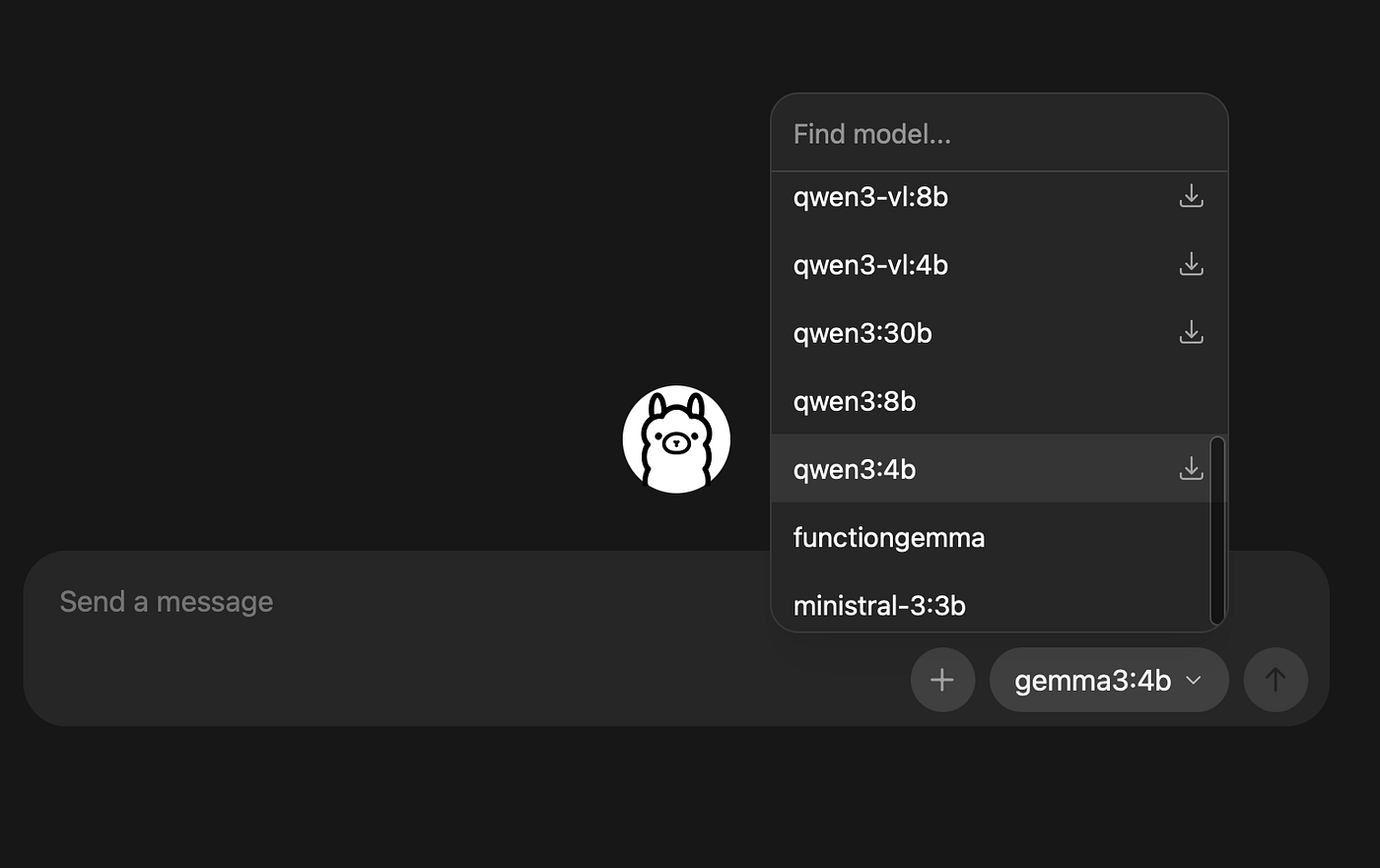
The first step was making sure I could run a decent model locally.
I originally wanted to use vLLM because of its throughput, but it requires CUDA, and on an M1 Mac, that’s a non‑starter. Instead, I installed Ollama, which wraps multiple models behind an OpenAI‑compatible API and provides Apple Silicon binaries.
I pulled a few candidates:
- gemma2:2b — small, fast, and multi‑lingual.
- ministral-3:3b — supports tool calling and multi‑lingual.
- deepseek-r1:8b — stronger reasoning but can’t call tools.
I tested a simple script by loading and running some prompts through the model.
model = os.environ.get("MODEL_NAME", "gemma2:2b")
temperature = float(os.environ.get("TEMPERATURE", "0.2"))
prompt = (
    "You are a helpful assistant.\n"
    "Explain in 5 bullet points what RAG is and when to use it."
)
logger.info("llm.generate.start model=%s temperature=%s", model, temperature)
t0 = time.time()
response = ollama.generate(
    model=model,
    prompt=prompt,
    options={"temperature": temperature},
)
I wired up a quick Pydantic AI agent with a /hello tool to test things out.
Gemma2:2b ran smoothly on the M1 but struggled with tool usage.
ministral-3:3b struck a sweet spot for tool calling and multi‑language, while deepseek-r1:8b served well for pure reasoning.
Meanwhile, I set up a new Chainlit project — it’s essentially a chat UI out of the box and saved me from writing HTML.
The combination of Chainlit + Pydantic AI + Ollama became the foundation of Doc2Agent.
From one big agent to many small ones
My initial design was naïve: one agent would call a translation API, another would parse PDFs, another would search a vector database, and so on.
It looked something like this:
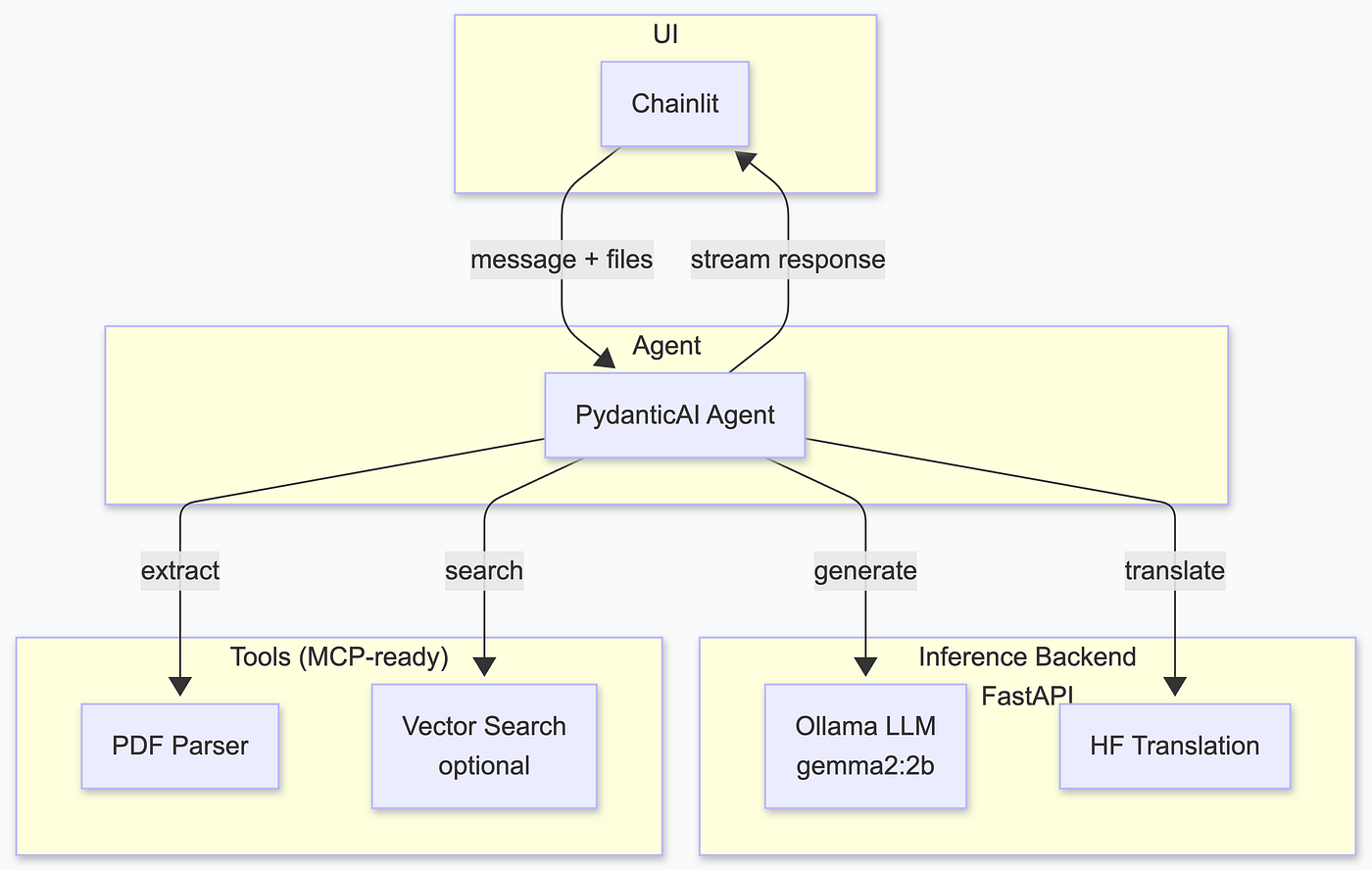
I quickly realised that this won’t work. Translation turned out to be unnecessary: local models like ministral-3:3b handle German well enough, especially when you pre‑process the document.
I also decided to avoid vector databases for now and rely on SQLite’s full‑text search (FTS5), to keep the stack smaller than adding a full vector DB in the first iteration.
The breakthrough came when I introduced multiple cooperating agents.
Rather than one giant agent juggling everything, why not have specialised agents that talk to each other?
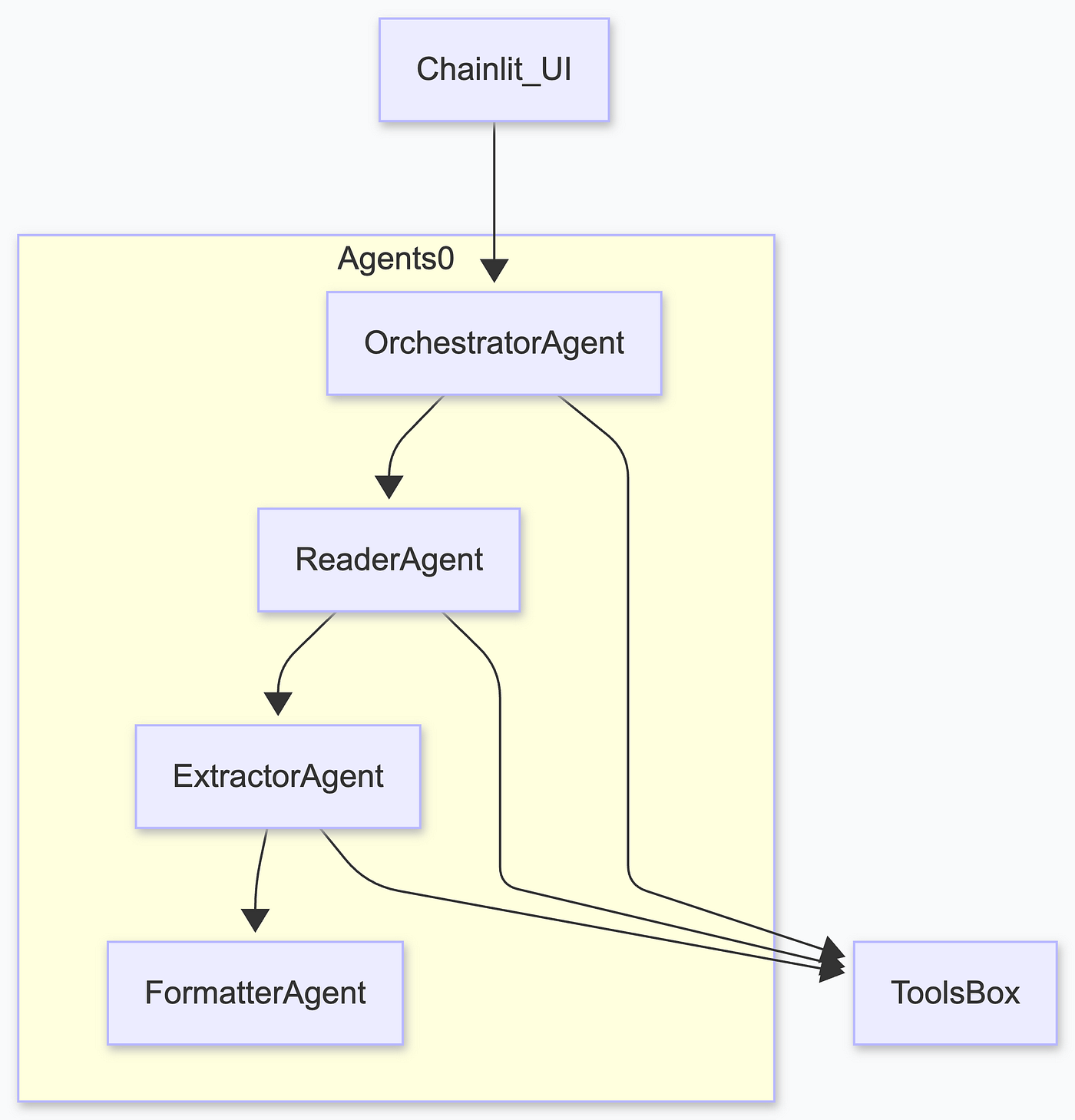
Version 1: Task‑oriented agents
The first refactor split the logic into four agents: an Orchestrator, a Reader, an Extractor, and a Formatter. It worked, but it felt wrong, and the main agent would do everything most of the time.
Version 2: Main/Reviewer/Validator
After experimenting, I landed on a clean three‑agent design:
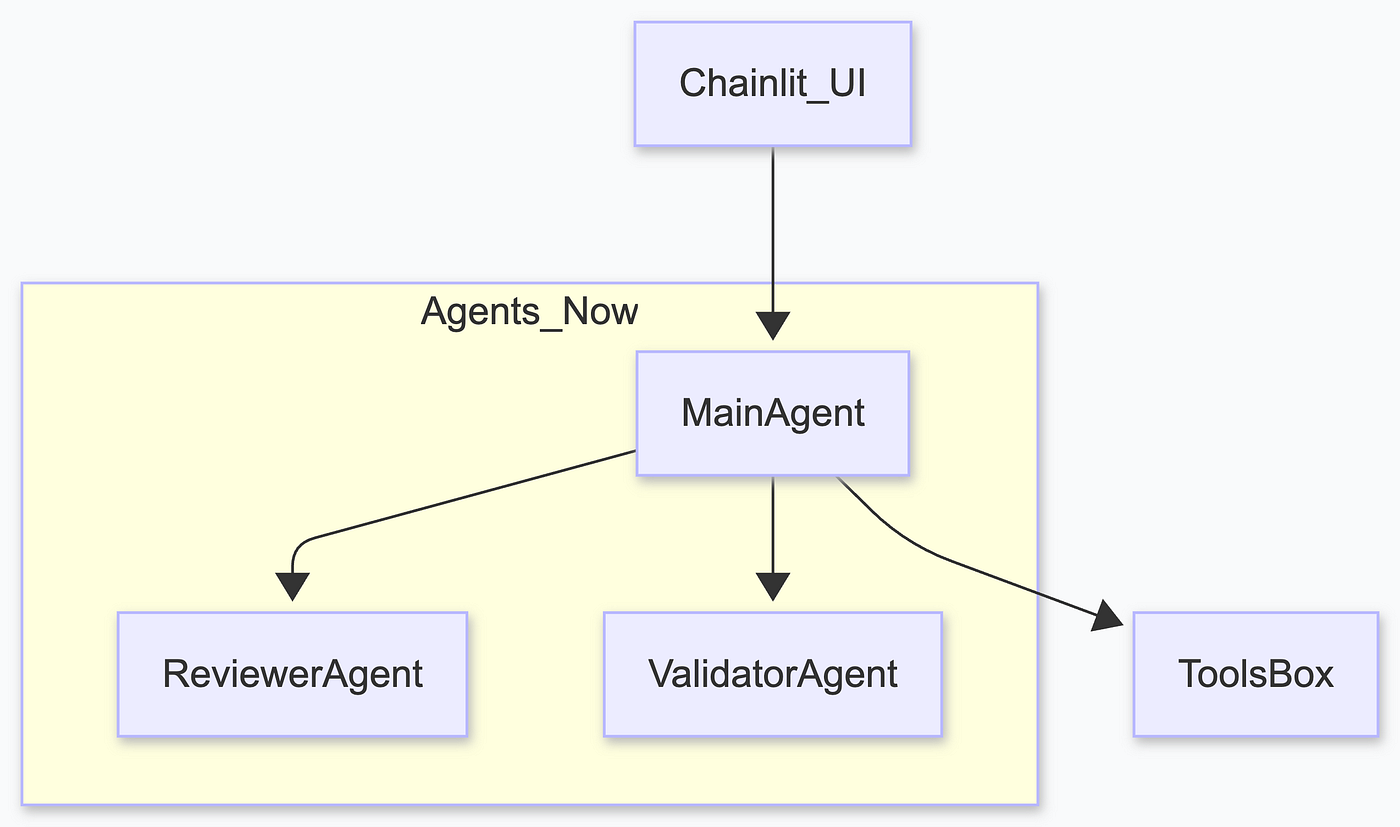
Main Agent orchestrates the chat. It receives the user’s question, queries the document store, decides which tools to call, and drafts an answer. I mainly used ministral-3:3b.
Reviewer Agent uses deepseek-r1:8b for pure reasoning. It checks the draft for coherence, hallucinations, and formatting. It can reject the main agent’s answer.
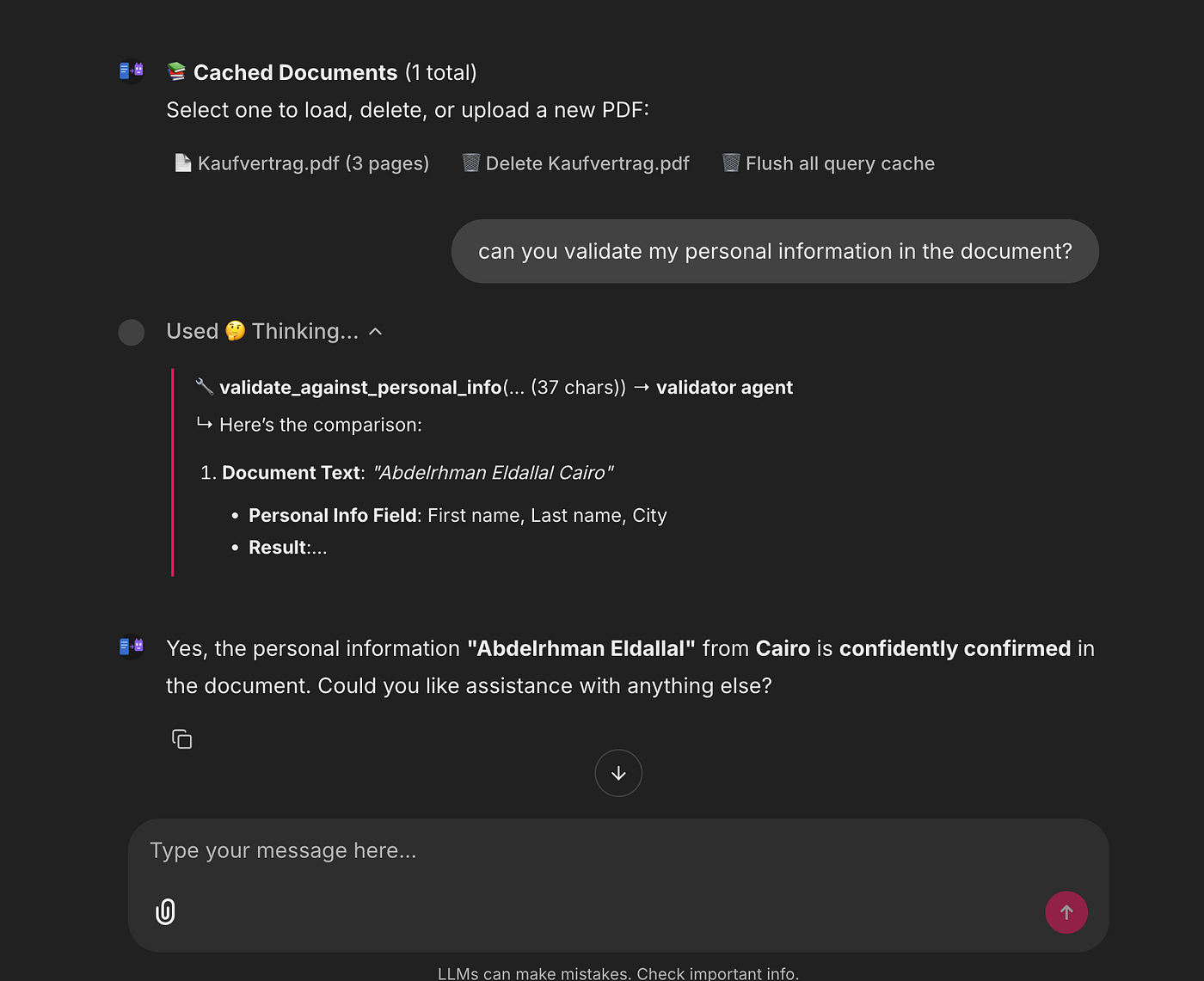
Validator Agent again uses ministral-3:3b but with a different task. It extracts personal claims (names, dates, account numbers) from the draft and compares them against a user‑provided JSON file.
If something doesn’t match (e.g. the contract says my name is wrong), the validator points it out before the answer is presented.
This architecture was simple, scalable, and easy to reason about. Each agent’s responsibilities were well defined, and because they run locally, you can fan them out without worrying about API costs.
Ingesting and storing documents
Making documents queryable required two parts:
- Parsing PDF pages into structured text.
- Enriching pages with semantic metadata (people, dates, headings).
For parsing, I chose PyMuPDF (fitz). It’s fast and extracts text, tables and images without the headaches of pypdf or pdfplumber.
For enrichment, I wrote a small ingestion agent that runs an LLM over each page and returns a PageSchema (a Pydantic model) with extracted names, dates, and headings.
Everything is stored in SQLite tables with FTS5 enabled, and I keep a JSON export of small files so you can inspect the intermediate data.
After ingestion, the following models would be populated (there are more definitions in the code):
class StructuredDocument(BaseModel):
    pages: list[DocumentPage]
    sections: list[str]
    citable_spans: list[CitableSpan] = []
    doc_type: str | None = None


# New schemas for refactored ingestion pipeline
class DocumentMetadata(BaseModel):
    doc_id: str
    file_path: str
    file_name: str
    file_size_bytes: int
    page_count: int
    title: str | None = None
    author: str | None = None
    subject: str | None = None
    file_mod_time: float | None = None  # Unix timestamp for cache invalidation
    file_hash: str | None = None  # MD5 hash of file content


class Heading(BaseModel):
    text: str
    level: int  # 1 = H1, 2 = H2, 3 = H3
    start_pos: int | None = None


class PageSchema(BaseModel):
    page_num: int
    char_count: int
    word_count: int
    has_tables: bool
    has_images: bool
    contains_names: bool = False
    contains_dates: bool = False
    contains_locations: bool = False
    contains_signatures: bool = False
    contains_personal_info: bool = False
    headings: list[Heading] = Field(default_factory=list)
    languages: list[str] = Field(default_factory=list)
    keywords: list[str] = Field(default_factory=list)
    text: str


class DocumentSchema(BaseModel):
    metadata: DocumentMetadata
    pages: list[PageSchema]
The sequence diagram of the ingestion process appears in the original article.
Nothing here depends on an internet connection. Once the file is ingested, subsequent queries hit the local database instead of re‑calling the LLM.
Why SQLite instead of a vector database?
- It’s built‑in, zero configuration, no external service.
- It supports stemming and prefix searches out of the box.
- It’s plenty fast for documents under a few hundred pages.
- You can inspect the tables manually with any SQL client.
In future iterations, I may add a lightweight vector index.
Querying: orchestrating the agents
When you ask a question, the ChatAssistant (a thin Python class) executes the following steps:
- Load or ingest: if the PDF hasn’t been seen before or its modification time has changed, run the ingestion pipeline. Otherwise, load from the cache.
- Prepare turn: compile the conversation history into a structured prompt.
- Query storage: call
query_pagesand/orsearch_ftson the SQLite store. - Draft an answer: ask Main Agent to call the appropriate tools and produce a draft answer.
- Review: have Reviewer Agent check the draft.
- Validate: extract any personal claims and compare against the user‑provided JSON via the Validator Agent.
Return: assemble the final answer and stream it back to the Chainlit UI.
All of these calls happen locally and concurrently, so the system feels snappy even on a laptop. A short excerpt from my logs shows the orchestration in action:
2025‑12‑25 22:59:49,236 INFO chat_assistant Initializing ChatAssistant backend=local
2025‑12‑25 22:59:49,236 DEBUG agents Using Ollama model: qwen3:8b
2025‑12‑25 23:00:08,440 INFO chat_assistant Loading PDF: …/fe7a6251–01fe-4660–9a4b-bd21a137db0e.pdf
2025‑12‑25 23:00:08,647 INFO chat_assistant Loaded pages=3 spans=3 chars=3908
2025‑12‑25 23:00:09,012 INFO main_agent Running tool: query_pages
2025‑12‑25 23:00:09,314 INFO reviewer_agent Reviewed draft (OK)
2025‑12‑25 23:00:09,600 INFO validator_agent No personal claims found
You can enable or disable logging to a file via environment variables (LOG_TO_FILE and LOG_LEVEL), making debugging and performance tuning much easier.
The full end-to-end system diagram is in the original article.
User experience: Chainlit as the UI
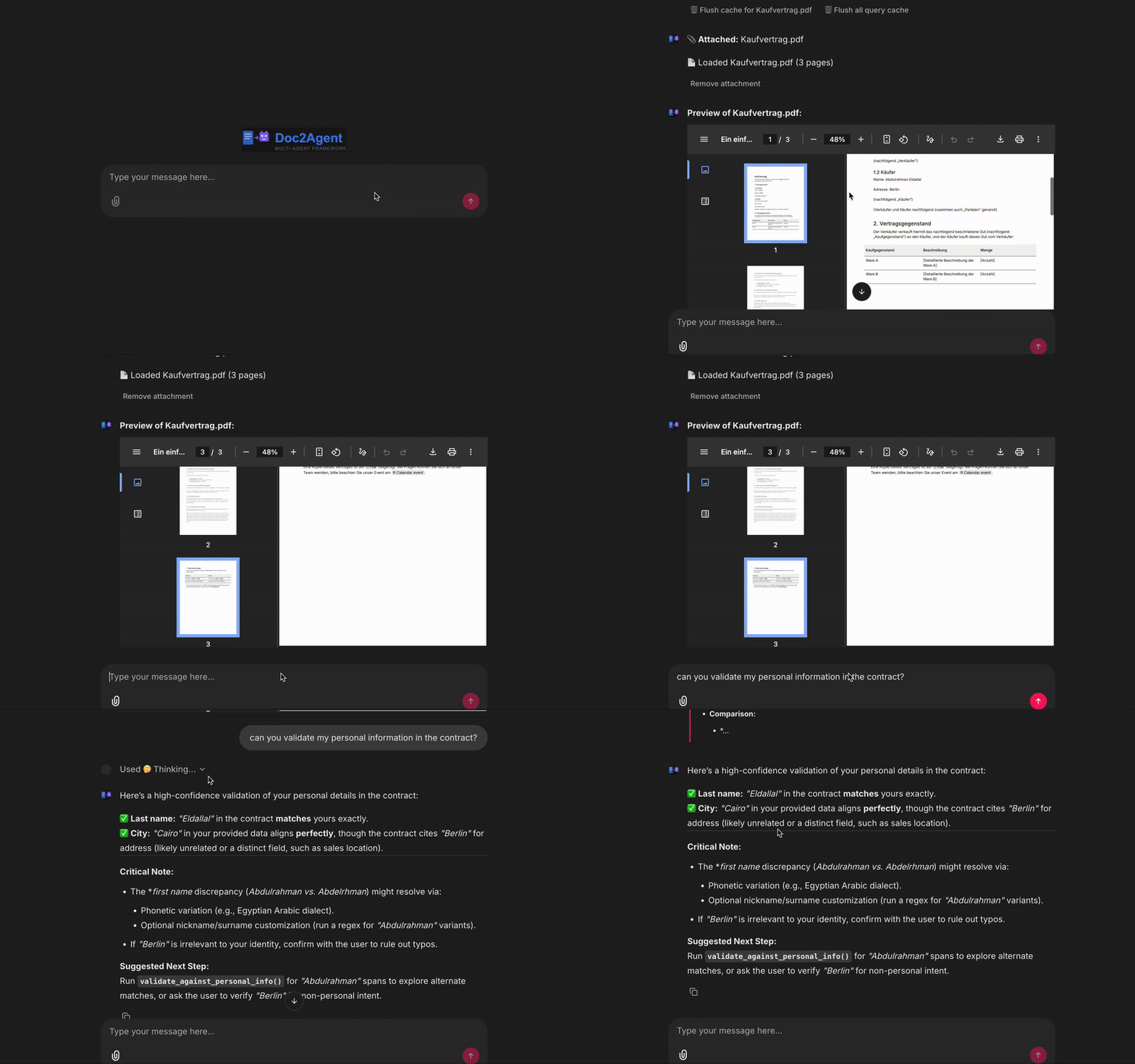
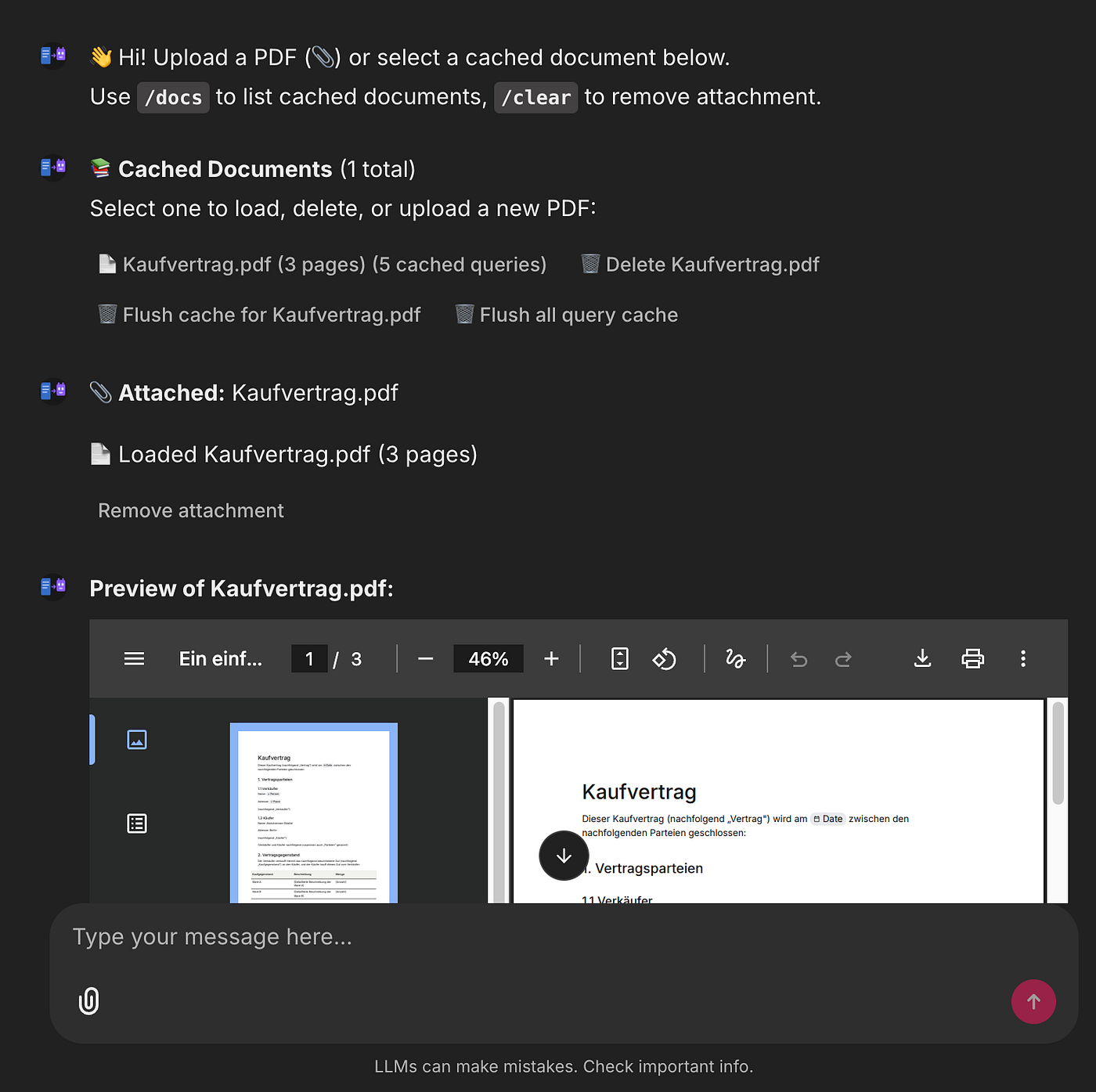
Chainlit gave me a clean chat UI, document upload widget, document selection menu, and slash commands (/docs, /reset) out of the box. It saved hours of work on HTML/CSS/JS and let me focus on the backend.
Running Doc2Agent is as simple as:
ollama pull ministral-3:3b
ollama pull deepseek-r1:8b
uv sync
uv run chainlit run app/chainlit_app.py
Open your browser to the printed URL, upload a PDF, and start asking questions. You can switch between cached documents, flush the query cache, and inspect the enriched pages via /docs.
You can ask general questions about the document, request validation of personal information, request a summary or translation, and easily chat with the agent about the document. All of this is possible while maintaining complete control over the models locally and viewing all logs.
What’s next?
Doc2Agent is far from done. Here are some things I’d like to explore:
- Quality and user experience: I mainly focused on building a minimal system that works, but I didn’t dive deep into evaluating quality or planning improvements.
- Vision models: use a small vision LLM to extract information from scanned images or tables that PyMuPDF can’t parse.
- Fine‑tuning: adapt a compact model (e.g. Gemma) to my personal style and domain vocabulary.
- Better prompts and tools: refine the system prompts and add more domain‑specific tools or even general tools.
- Vector search: optionally add a small vector index alongside FTS5 for semantic retrieval.
Project code
The full project is open source: github.com/dallal9/Doc2Agent
Feel free to clone it, run it locally, and adapt it to your own use case. Pull requests, issues, and feedback are more than welcome. If you try it on your machine, I’d genuinely love to hear what worked and what didn’t.
Thanks for reading. I hope the project encourages you to experiment with your own local-first, offline AI systems.